Feature
Your cloud storage.
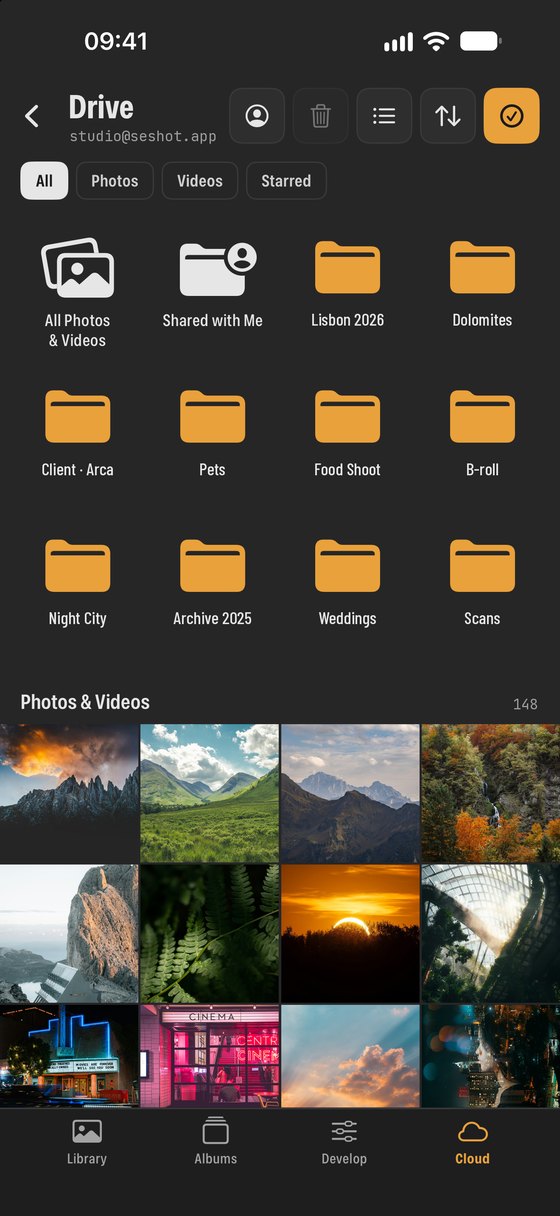
Browse the photos and videos you keep online as if they were on your iPhone.
Many photographers keep finished work and client deliveries online rather than on their phone. SEshot shows those folders with the same grid, viewer and tools as your library, so you do not have to download everything to look at it.
Connect
- Google Drive, Dropbox and Frame.io with your own account.
- A NAS over WebDAV (Synology, QNAP and others).
- Anything in the Files app: iCloud Drive, OneDrive, Box, USB drives and SMB servers.
Browse and play
- Folders as icons or a list, sorted by name, date, rating or label.
- Stream videos without downloading them first, with the same scopes and grading tools.
- The same viewer, Studio panel and details as your library.
Manage
- Select many files to share, save to Photos or Files, rate, label, move to another folder or delete.
- Rename files and edit photos in Develop, saving back next to the original.
- Disconnect any service at any time.
Private
- SEshot talks to each service directly from your device. Nothing passes through our servers, because there are none.
How the connection works
- Direct
- You sign in to each service in SEshot. The app then talks to the service straight from your device; there is no SEshot server in between.
- Streaming
- Thumbnails and videos load as you scroll and play. Photos are downloaded only when you open them full size or edit them.
- NAS
- Most home and office NAS boxes (Synology, QNAP, TrueNAS, Nextcloud) can share folders over WebDAV. Turn it on in the NAS settings and enter its address in SEshot.
- Files app
- Anything the Files app can open, such as iCloud Drive, OneDrive, Box, USB drives and SMB servers, also works in SEshot.
- Disconnect
- Remove any service from its account button. Its sign-in is deleted from your device.